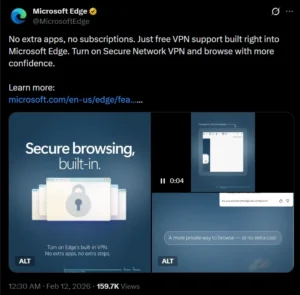
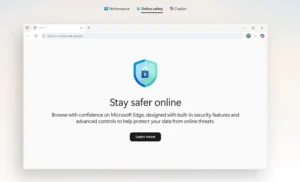
Microsoft recently promoted Edge Secure Network VPN—a free, built-in privacy tool—on X (formerly Twitter). The feature does not require extra apps or subscriptions. This move aimed to raise awareness about Edge’s lesser-known privacy options, especially among privacy researchers.
Source: Microsoft Edge
The official Microsoft Edge account described the VPN (Virtual Private Network) as an easy way to boost security, particularly on public Wi-Fi. They encouraged users to activate it through Edge’s settings. Edge Secure Network VPN is fully integrated, so you do not need to install any extra software. However, there is a monthly data cap.
24/7 customer support with phone support in 6 countries
7-day free trial on mobile
Cons:
Spotty streaming access
US Jurisdiction
No free trial for desktop users
Monthly plan not covered by money-back guarante
Some DNS leak reports in testing
Frequently Asked Questions
What is Microsoft Edge Secure Network VPN?
Microsoft Edge Secure Network VPN is a free, built-in privacy feature in the Edge browser. It encrypts browser traffic and hides your IP address without requiring extra apps or subscriptions.
Is Edge Secure Network a real VPN?
No, Edge Secure Network is not a full VPN. It works as a browser-level proxy and only protects traffic within the Edge browser, not your entire device.
How much free data does Edge Secure Network VPN provide?
Microsoft provides 5 GB of free data per month with Edge Secure Network VPN. Once the limit is reached, protection stops until the next monthly reset.
How does Edge Secure Network protect users?
Edge Secure Network encrypts browser traffic and hides your IP address. This helps protect sensitive information like passwords and payment details, especially on public Wi-Fi.
What are the limitations of Edge Secure Network VPN?
Edge Secure Network only protects browser traffic and requires a Microsoft account. It does not allow server selection and does not protect other apps or system-wide traffic.
Get IP Vanish VPN
Ready to be secured? Get IP Vanish VPN and save 20%
A privacy researcher quickly reacted with a technical analysis. He claimed that the feature works.
Source: X
different from a standard VPN. As his comments spread, the debate shifted to how companies label browser privacy features. The discussion focused on what users can reasonably expect in terms of protection.
Edge Secure Network: Proxy, Not Full VPN
To clarify, Edge Secure Network is not a true VPN. It uses Cloudflare’s Privacy Proxy Platform as an HTTP CONNECT proxy. Sooraj Sathyanarayanan, a privacy expert at Brave Browser, said the feature only tunnels traffic within Edge.
Microsoft’s Explanation
Microsoft calls Edge Secure Network VPN a “lightweight, browser-level protection feature.” It encrypts traffic inside Edge using “VPN technology.” According to Microsoft, the service limits tracking and protects users from malicious actors.
Enabling Edge Secure Network VPN
Edge can route your browser traffic through an encrypted tunnel. This protects sensitive info like passwords and payments, especially on public networks. Microsoft says the feature also hides your IP address when you visit websites.
Source: Microsoft Edge
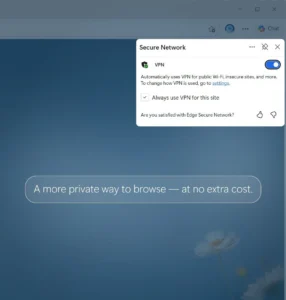
To enable it: click the three dots in the upper right of Edge, select ‘More tools,’ and then ‘Secure Network.’ After signing in to your Microsoft account, click “Get VPN for free.”
Limitations and Usage Restrictions
You get 5 GB of free data per month with your Microsoft account. Once you use up the allowance, the protection stops until the next month. Edge disables the feature for high-bandwidth tasks like streaming video.
The feature does not work on managed or corporate devices. It is also unavailable in some locations. Users cannot pick a server location; Edge connects to the nearest server automatically.
Automatic Activation and User Control
Microsoft says the VPN (Virtual Private Network) activates automatically when it detects risky situations, such as visiting unsecured sites. Users can decide whether to turn it on for certain sessions or all the time. Microsoft describes it as a basic, built-in security tool, not a full replacement for standalone VPNs. Marketing materials mention “VPN technology” and “free VPN data protection,” but do not claim that it matches paid VPN services.
Expert Analysis: How Edge Secure Network Differs from VPNs
Sooraj Sathyanarayanan responded to Microsoft’s claims. He explained that most users expect a VPN (Virtual Private Network) to protect all device traffic, while Edge Secure Network only protects browser traffic. Edge Secure Network only protects browser traffic. DNS requests, system updates, email, and other apps still use the regular network connection.
Sathyanarayanan said Edge Secure Network is an HTTP CONNECT proxy. It is built on Cloudflare’s Privacy Proxy and secures only Edge sessions. Paid VPNs, in contrast, usually route all your traffic and let you pick server locations.
Configuration and Privacy Concerns
Edge Secure Network comes in an “optimized” mode by default. Protection does not activate unless users change the settings. You must sign in with a Microsoft account to use the feature. The researcher noted that the functionality links the VPN to your identity, which may concern privacy-focused users. Microsoft says the mechanism is needed to enforce the 5 GB cap.
The design relies on trust between Microsoft (for identity) and Cloudflare (for network routing). Both companies say they avoid accessing account names or inspecting traffic, and this is unverified by any third party.
The researcher also pointed out issues with transparency, lack of device-wide protection, and no manual region selection.
Source: Edge
Browser Security Features vs. Full VPNs
Other browsers, like Opera, also offer built-in VPN tools. These features help simplify security for users. They protect against obvious threats, such as open Wi-Fi, and activate automatically in certain cases. They are easy to use and do not slow down your system like some full VPNs (Virtual Private Networks), which provide a secure connection over the internet.
However, browser-integrated tools are not substitutes for proper VPN services. Clear communication is key. Users should know what these features can and cannot do. The debate about the value of the Edge Secure Network will continue as Microsoft provides more details about its purpose and limitations.
A passionate content writer with four years of experience delivering high-quality content across multiple domains. I believe in writing that informs, connects, and adds value.