How do I Connect a Soundbar to Firestick? Easy Setup Guide
Editor's Choice
#1 Pick
Editor's Choice
 NordVPN
$4.39/month
Save 20%
Blazing Fast
6,998+
214
8
Step by Step Instructions
Step 01

Go to Search on Fire TV
On your Fire TV home screen, select the Search (Find) option at the top.
Step 02

Type “NordVPN”
Use your remote to type NordVPN and choose the app when it appears in the results.
Step 03

Install the App
Click on Get or Download to install NordVPN on your Fire TV.
Step 04

Log In & Connect
Open the app, sign in to your account, and press the connect button to start using the VPN.
How to Connect a Soundbar to Firestick?
Set up your Soundbar through HDMI, Optical or Bluetooth with this easy guide
Step 01
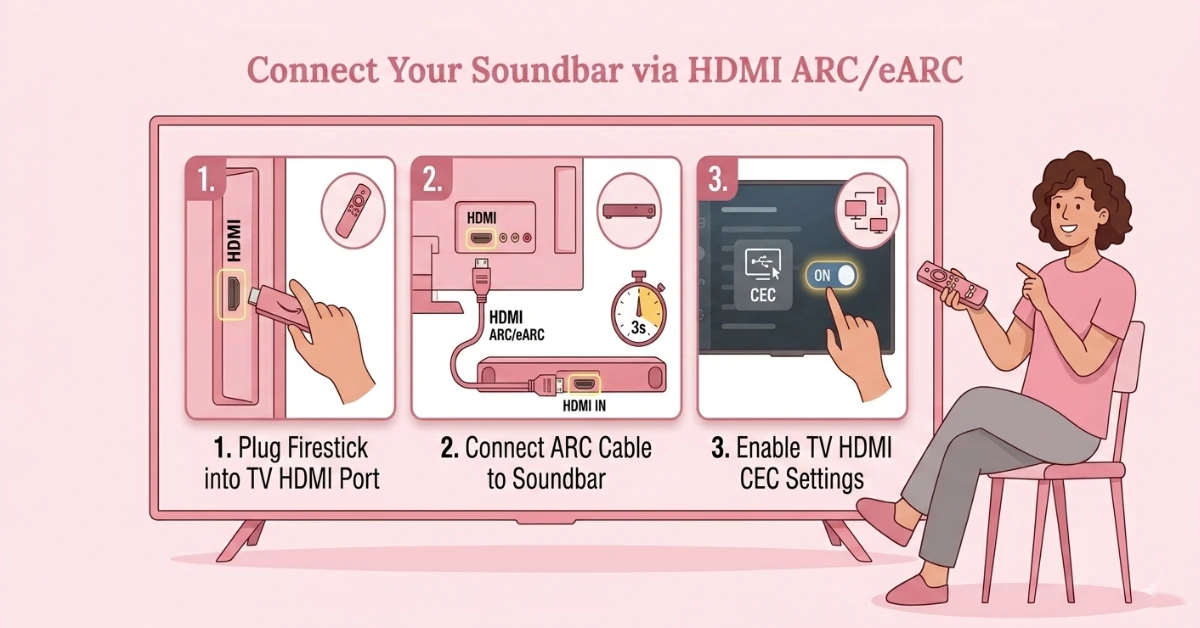
Connect Your Soundbar Using an HDMI ARC Cable
-
Plug your Firestick into any available HDMI port on your TV
-
Connect an HDMI cable from your TV's ARC or eARC port to the HDMI input on your soundbar
-
Enable HDMI CEC on your TV settings so both devices can be controlled with one remote
-
Make sure both your TV and soundbar are powered on
Step 02
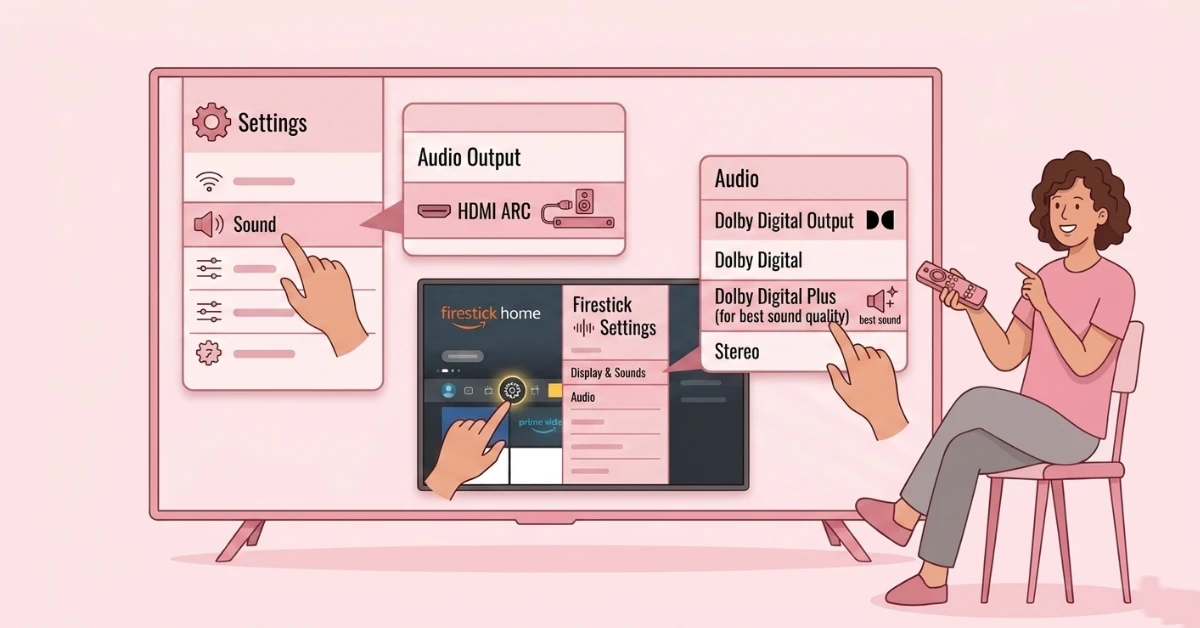
Set the Audio Output for HDMI ARC
-
Go to TV Settings, open Sound and change the audio output to HDMI ARC
-
On Firestick go to Settings, select Display and Sounds, then Audio
-
Set Dolby Digital Output to Dolby Digital Plus for the best sound quality
-
Your soundbar is now successfully connected to your Firestick via HDMI ARC
Get NordVPN — 20% Off
Step 03
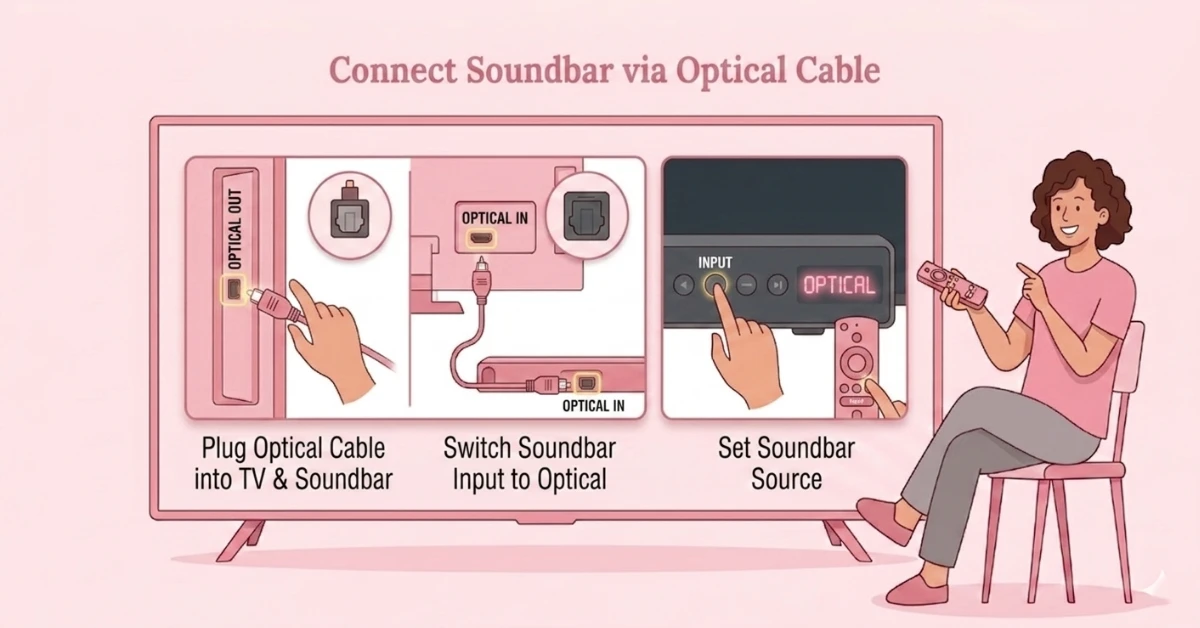
Connect Your Soundbar Using an Optical Cable
-
Plug one end of an optical cable into the Optical Out port on your TV
-
Connect the other end into the Optical In port on your soundbar
-
Switch the soundbar input to Optical using the Input button on the soundbar
-
Ensure the cable is firmly inserted at both ends for a proper connection
Step 04
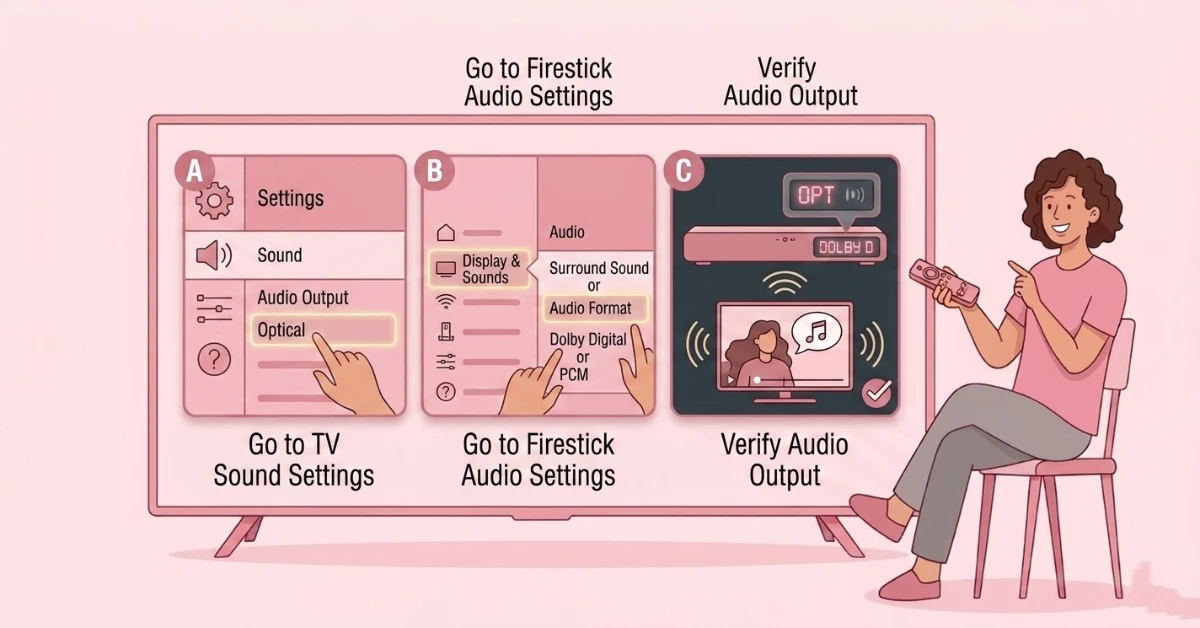
Set the Audio Output for Optical
-
Go to TV Settings, open Sound and change the audio output to Optical
-
On Firestick go to Settings, select Display and Sounds, then Audio
-
Set the audio format to Dolby Digital or PCM depending on your soundbar compatibility
-
Your soundbar is now successfully connected to your Firestick via Optical cable
Get NordVPN — 20% Off
Step 05
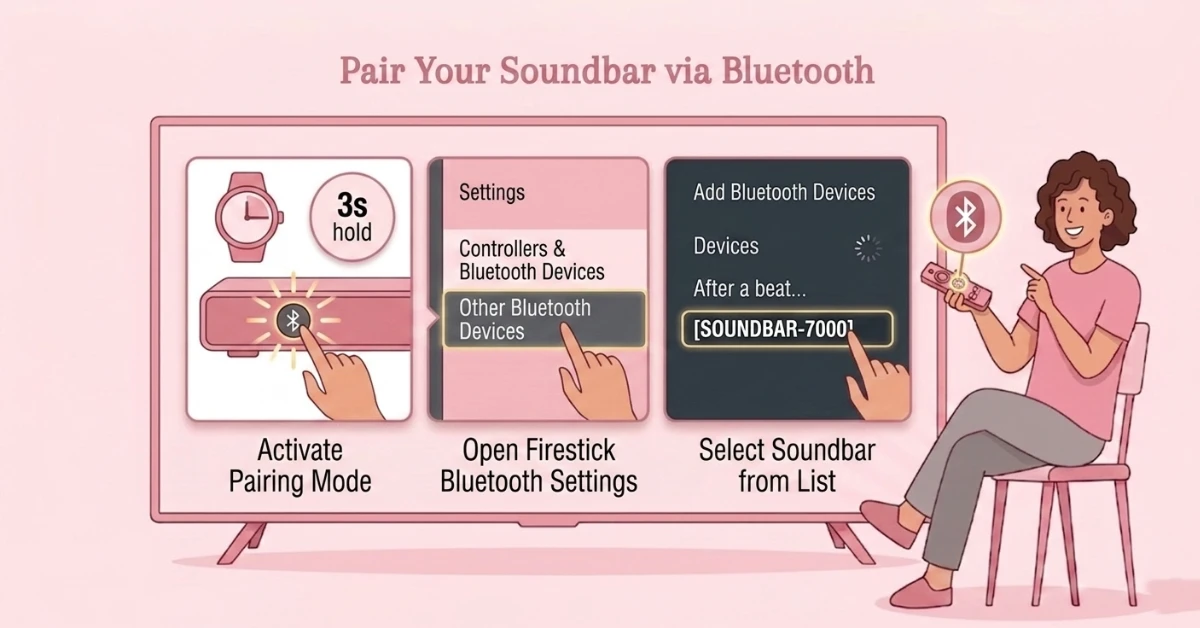
Pair Your Soundbar via Bluetooth
-
Put your soundbar in pairing mode by pressing the Bluetooth button until the LED flashes
-
On Firestick go to Settings, select Controllers and Bluetooth Devices, then Other Bluetooth Devices
-
Click Add Bluetooth Devices and wait for your soundbar name to appear
-
Select your soundbar from the list to begin pairing
Step 06
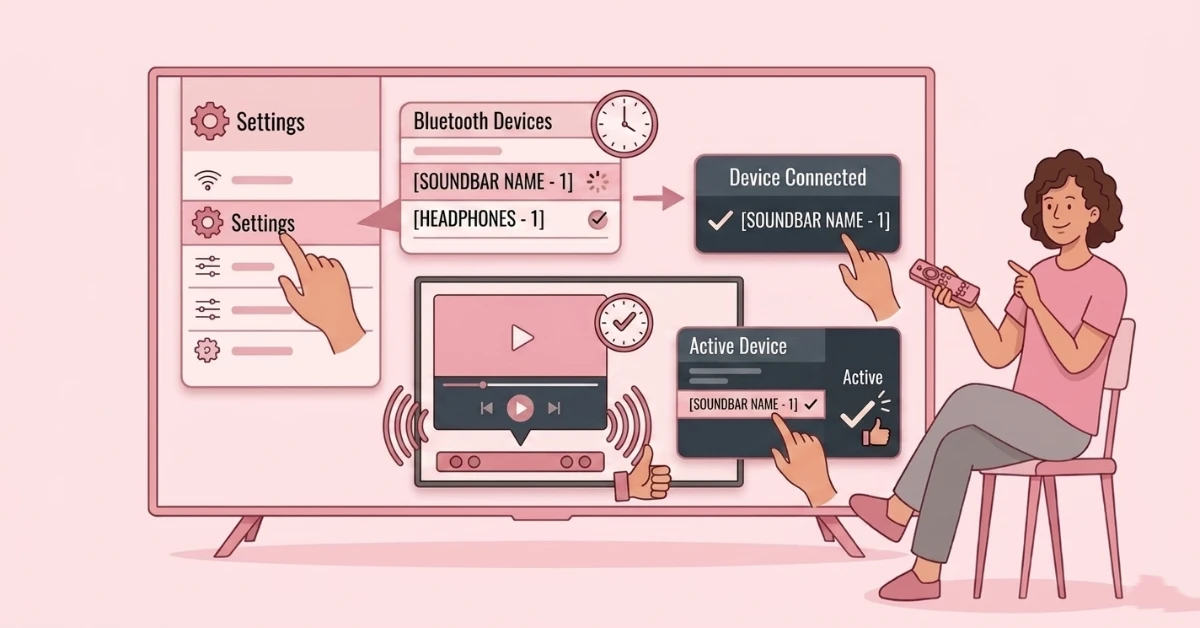
Confirm Your Bluetooth Connection
-
Wait for the Device Connected confirmation to appear screen
-
Play any content to test that audio is coming through the soundbar
-
If audio does not play, go back to Bluetooth settings and confirm the soundbar is set as the active audio device
-
Your soundbar is now successfully connected to your Firestick via Bluetooth
Quick Comparison
Side-by-side comparison of top Fire Stick VPNs
| VPN | Price | Servers | Speed | Devices | Rating | Actions |
|---|---|---|---|---|---|---|
|
NordVPN
|
$4.39/mo | 6,998+ | Blazing Fast | 8 | 4.8 | Get Deal |
 EXPRESS VPN
|
$2.79/mo | 3,000+ | Blazing Fast | 8 | 5 | Get Deal |
 Proton VPN
|
$3.99/mo | 14,999+ | Blazing Fast | 7 | 4.8 | Get Deal |
 IPVanish
|
$2.49/mo | 3,100+ | Blazing Fast | 6 | 4 | Get Deal |
 Pure VPN
|
$3.55/mo | — | Blazing Fast | 6 | 4 | Get Deal |
Frequently Asked Questions
What is the best way to connect a soundbar to Fire Stick?
Using a HDMI ARC is the best and most recommended method to connect a soundbar to Fire Stick as it delivers the highest audio quality and allows single remote control via HDMI CEC. If your TV does not have an ARC port, an optical cable is the next best option.
Can I connect any soundbar to Fire Stick?
Yes, most modern soundbars can connect to Fire Stick via HDMI ARC, optical cable, or Bluetooth. Make sure your soundbar supports at least one of these connection types before setting up.
Do I need to change any settings on Firestick for a soundbar setup?
Yes, after connecting your soundbar go to Firestick Settings, select Display and Sounds, then Audio, and set the Dolby Digital Output to Dolby Digital Plus. If you experience compatibility issues, switching to Stereo or PCM usually resolves them
Can I control soundbar volume with my Fire TV Stick remote?
Yes, if your soundbar is connected via HDMI ARC and HDMI CEC is enabled on your TV, you can control soundbar volume and power directly using your Fire TV Stick remote. This eliminates the need to use a separate soundbar remote.
How do I know if my TV has an HDMI ARC or eARC port for Fire Stick soundbar connection?
Check the back of your TV for an HDMI port labelled ARC or eARC, which is usually found on one specific HDMI port rather than all of them. If your TV does not have an ARC port, you can use an optical cable or Bluetooth to connect your soundbar to Fire Stick instead.
Is optical audio better than Bluetooth for Fire Stick soundbar connection?
Yes, optical audio delivers better sound quality and more reliable sync compared to Bluetooth for a Fire Stick soundbar connection. Bluetooth may introduce slight audio delay while optical provides a consistent and stable digital audio signal.
How do I enable Dolby Digital Plus on Fire Stick for my soundbar?
Go to Firestick Settings, select Display and Sounds, then Audio, and set Dolby Digital Output to Dolby Digital Plus. Make sure your soundbar supports Dolby Digital Plus to take full advantage of this setting.
Why is CEC volume control not working on my Fire Stick soundbar?
If CEC volume control is not working, check that HDMI CEC is enabled on both your TV and soundbar settings as some devices have it turned off by default. Also make sure your soundbar is connected specifically to the ARC or eARC port on your TV rather than a standard HDMI input.
Why is there no sound from my soundbar when using Fire Stick?
This is usually caused by an incorrect audio output setting on your TV. Go to your TV Settings, open Sound, and make sure the audio output is set to match your connection type, either HDMI ARC, Optical, or Bluetooth.