How to Use Prime Video X-Ray on Firestick? Easy Guide
Editor's Choice
#1 Pick
Editor's Choice
 EXPRESS VPN
$2.79/month
Save 20%
Blazing Fast
3,000+
214
8
Step by Step Instructions
Step 01

Open the Amazon App Store
From your Firestick home screen, navigate to the “Find” or search icon and open the Amazon App Store.
Step 02

Search for ExpressVPN
Type “ExpressVPN” in the search bar using your remote. Select the official ExpressVPN app from the results.
Step 03

Download & Install the App
Click on the “Download” or “Get” button to install the app on your Firestick. Wait for the installation to complete.
Step 04

Sign In & Connect
Open the app, sign in with your ExpressVPN account, and tap the power button to connect to a server.
How to Use Prime Video X-Ray on Firestick?
A simple guide to explore Prime Video X-Ray while you stream on Firestick
Step 01
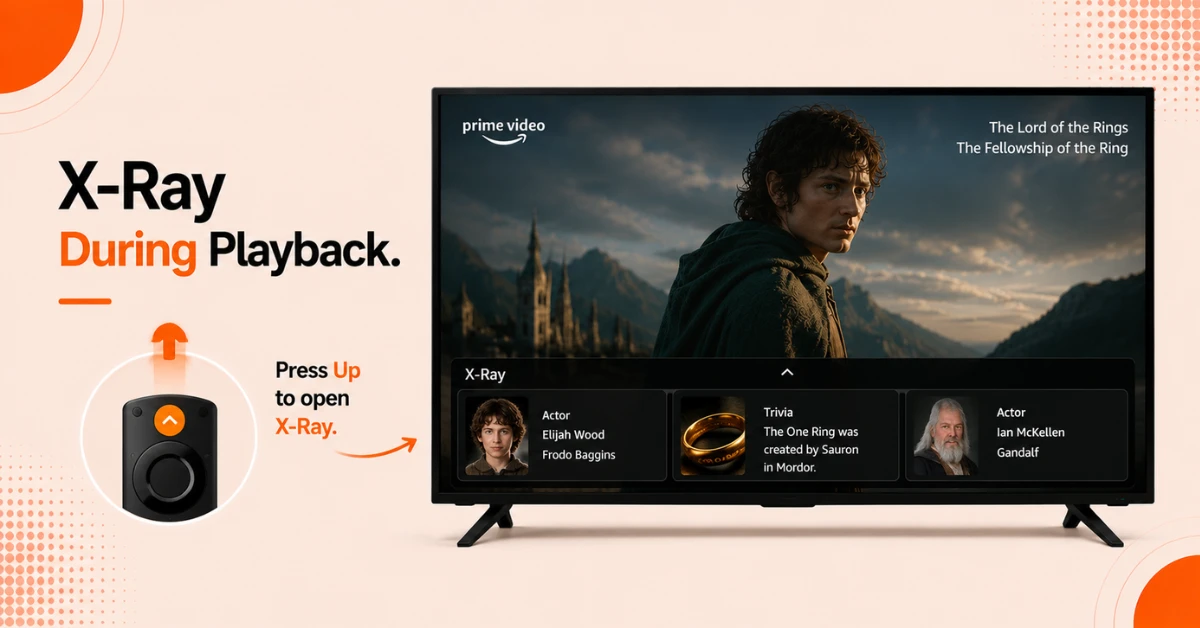
Access X-Ray During Playback
-
Open any movie or show on Prime Video on your Firestick
-
Press the Up button on your remote while the content is playing
-
The X-Ray panel will appear at the bottom of the screen showing information about the current scene
Step 02
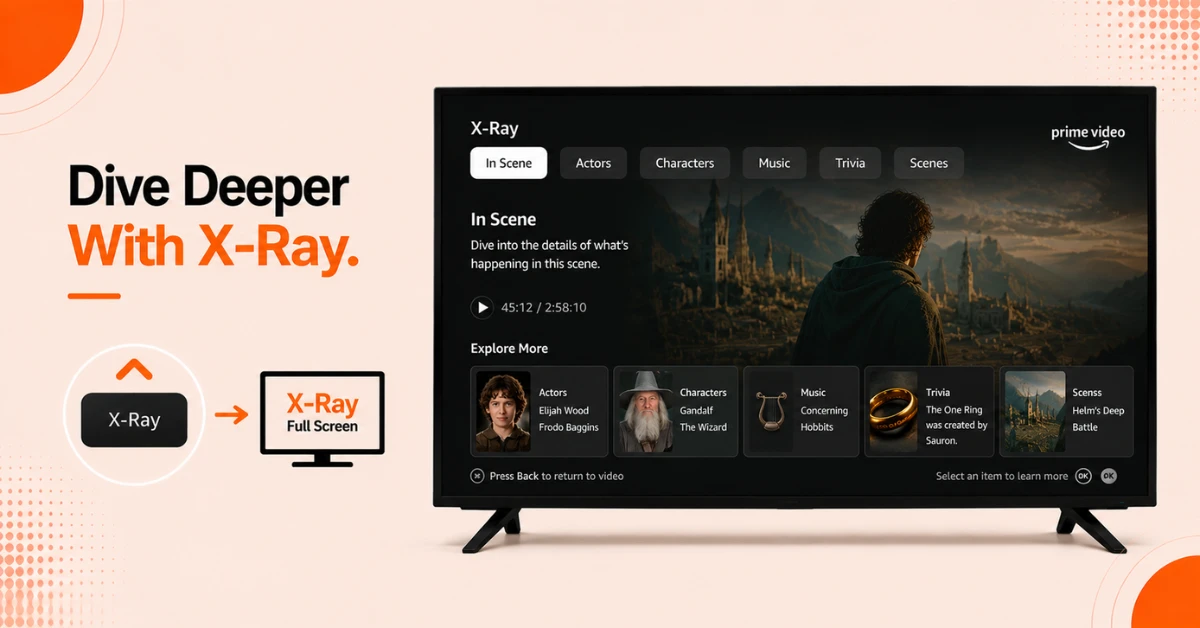
Explore the X-Ray Tabs
-
Press Up again or select X-Ray to open the full screen X-Ray experience
-
Browse through tabs including In Scene, Actors, Characters, Music, Trivia, and Scenes
-
Select any item to read more details without leaving what you are watching
Get EXPRESS VPN — 20% Off
Step 03
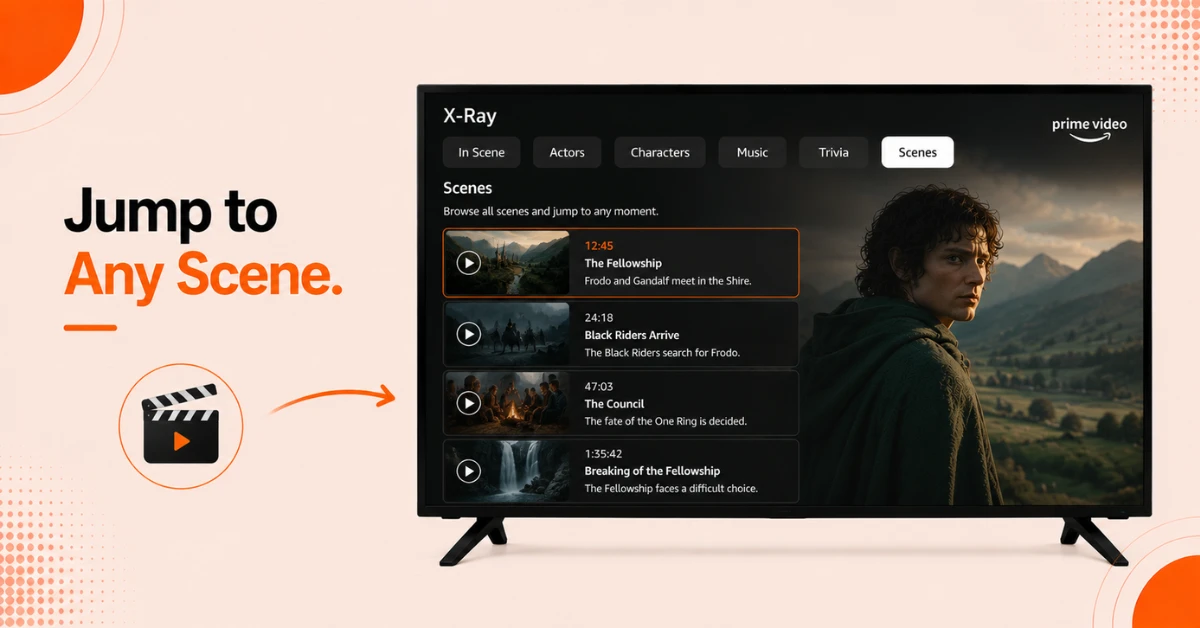
Jump to Any Scene Directly
-
Select the Scenes tab inside X-Ray to see a list of all scenes in the movie or show
-
Each scene includes a thumbnail and a brief description
-
Select any scene to jump directly to that point in the content
Step 04
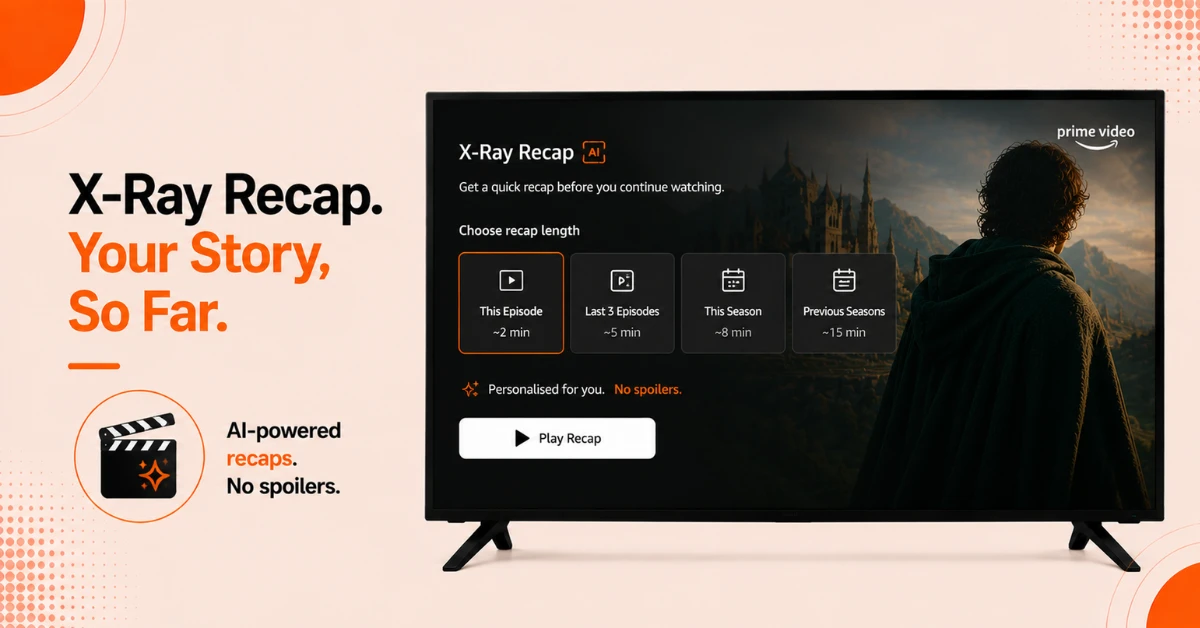
Use X-Ray Recap to Catch Up
-
X-Ray Recap uses AI to generate a personalised summary of a show before you resume watching
-
Access it from the title screen of the show or when paused within an episode
-
Select the recap length you want, from a single episode to multiple seasons, without any spoilers
Quick Comparison
Side-by-side comparison of top Fire Stick VPNs
| VPN | Price | Servers | Speed | Devices | Rating | Actions |
|---|---|---|---|---|---|---|
|
EXPRESS VPN
|
$2.79/mo | 3,000+ | Blazing Fast | 8 | 5 | Get Deal |
 Proton VPN
|
$3.99/mo | 14,999+ | Blazing Fast | 7 | 4.8 | Get Deal |
 NordVPN
|
$4.39/mo | 6,998+ | Blazing Fast | 8 | 4.8 | Get Deal |
|
|
$1.88/mo | 3,200+ | Blazing Fast | 8 | 4.7 | Get Deal |
 IPVanish
|
$2.49/mo | 3,100+ | Blazing Fast | 6 | 4 | Get Deal |
 Pure VPN
|
$3.55/mo | — | Blazing Fast | 6 | 4 | Get Deal |
Frequently Asked Questions
What is Prime Video X-Ray on Firestick?
Prime Video X-Ray on Firestick is an exclusive feature that lets you explore cast details, music, trivia, scene information, and production facts while you watch. It is available on most Prime Video movies, series, and live sports directly on your Firestick.
How do I access Prime Video X-Ray on Firestick?
Press the Up button on your Firestick remote while watching any Prime Video content to open the X-Ray panel. Press Up again to enter the full screen X-Ray experience where you can browse all available tabs.
Is Prime Video X-Ray available on all content on Firestick?
Prime Video X-Ray is available on most Prime Video movies and series on Firestick but not all titles have full X-Ray support. The availability of specific tabs like Trivia or Music depends on the content and how much information has been added for that title.
Can I use X-Ray on Firestick to identify a song playing in a show?
Yes, open X-Ray by pressing Up on your remote and select the Music tab. It will show you the name of the track currently playing along with the artist and other songs featured in the title so you can find and save them easily.
How do I close X-Ray on Firestick when I am done using it?
Press the Back button on your Firestick remote to close the X-Ray panel and return to your content. If you are in the full screen X-Ray view, pressing Back will take you back to the playback screen.
Is Amazon X-Ray on Fire TV free to use?
Yes, Amazon X-Ray on Fire TV is completely free to use for all Prime Video subscribers. There is no additional charge to access X-Ray features and no separate subscription required beyond your standard Prime Video membership.
Can I see a full cast list using Prime Video actor info on Firestick?
Yes, open X-Ray and select the Actors tab to view the complete cast list for the title you are watching. Each actor entry links to their IMDb profile giving you access to their full filmography and background information.
Does the Firestick X-Ray feature work on live sports?
Yes, the Firestick X-Ray feature is available on select live sports content on Prime Video. It provides real time stats, player information, and other relevant details that update as the game progresses making it a useful companion for sports viewers.