How to Find Firestick MAC Address? Step by Step Guide
Editor's Choice
#1 Pick
Editor's Choice
 EXPRESS VPN
$2.79/month
Save 20%
Blazing Fast
3,000+
214
8
Step by Step Instructions
Step 01

Open the Amazon App Store
From your Firestick home screen, navigate to the “Find” or search icon and open the Amazon App Store.
Step 02

Search for ExpressVPN
Type “ExpressVPN” in the search bar using your remote. Select the official ExpressVPN app from the results.
Step 03

Download & Install the App
Click on the “Download” or “Get” button to install the app on your Firestick. Wait for the installation to complete.
Step 04

Sign In & Connect
Open the app, sign in with your ExpressVPN account, and tap the power button to connect to a server.
How to Find Firestick MAC Address?
A simple guide to locating your Firestick MAC address and network details
Step 01
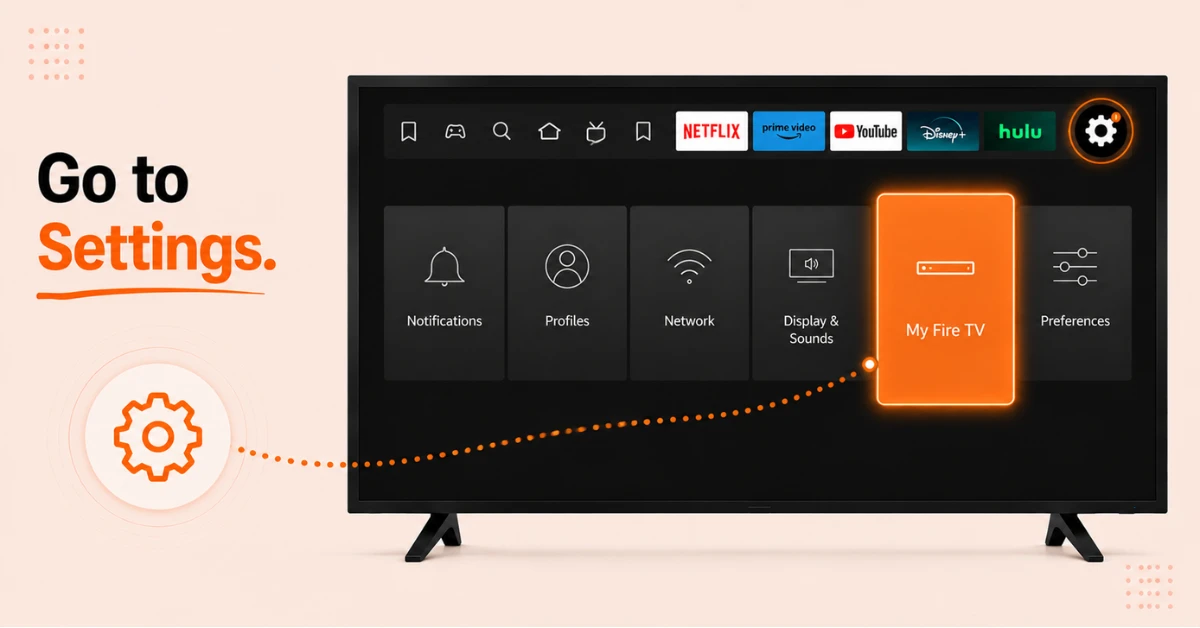
Go to Settings on Your Firestick
-
Press the Home button on your remote to go to the home screen
-
Select Settings from the top menu
-
Scroll right and select My Fire TV
Step 02
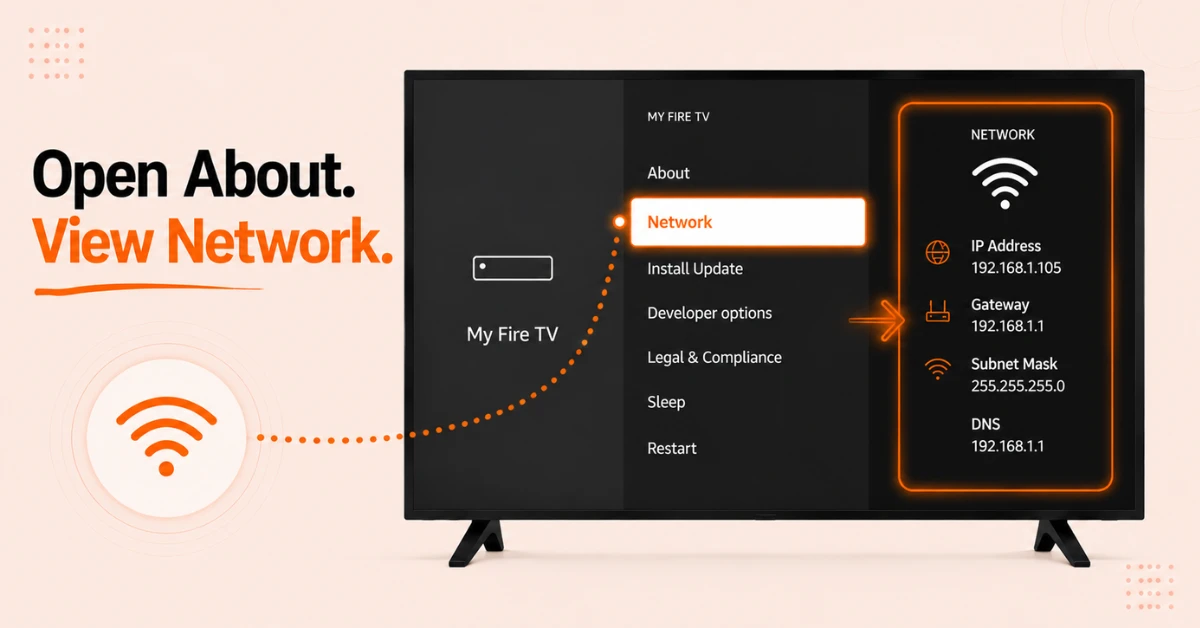
Open About and Select Network
-
Select About from the My Fire TV menu
-
Scroll down and select Network
-
A panel will appear on the right side of the screen with your network details
Get EXPRESS VPN — 20% Off
Step 03
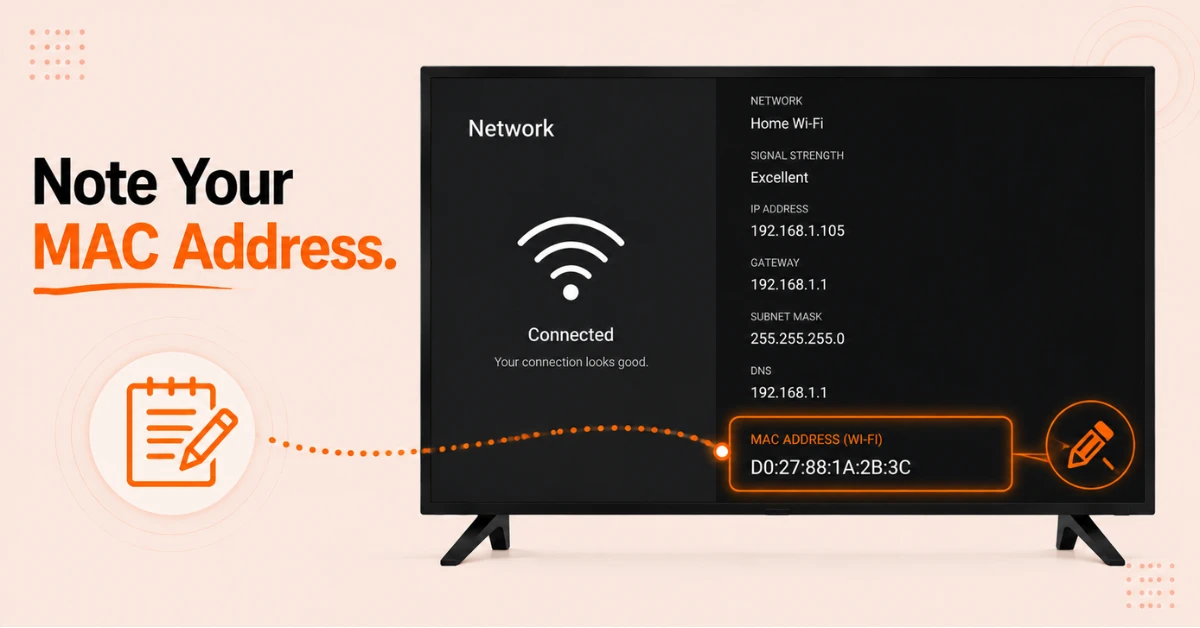
Note Your MAC Address
-
Your WiFi MAC address is displayed on the lower right side of the screen
-
Note it down carefully as you will need it for any network or router configuration
-
Your IP address is also shown here if you need it for any other network tasks
Step 04
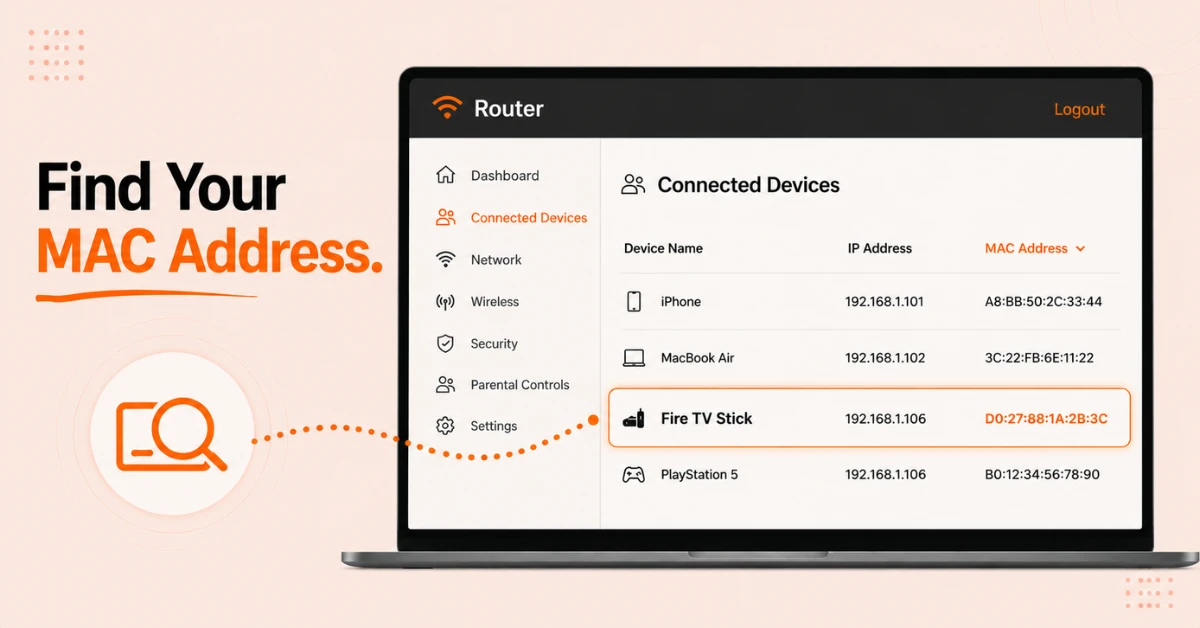
Find MAC Address From Your Router if Needed
-
If you cannot access your Firestick, log in to your router admin panel through a browser
-
Navigate to the Connected Devices section and look for your Firestick by name
-
Your Firestick MAC address will be listed alongside the device in the connected devices list
Quick Comparison
Side-by-side comparison of top Fire Stick VPNs
| VPN | Price | Servers | Speed | Devices | Rating | Actions |
|---|---|---|---|---|---|---|
|
EXPRESS VPN
|
$2.79/mo | 3,000+ | Blazing Fast | 8 | 5 | Get Deal |
 Proton VPN
|
$3.99/mo | 14,999+ | Blazing Fast | 7 | 4.8 | Get Deal |
 NordVPN
|
$4.39/mo | 6,998+ | Blazing Fast | 8 | 4.8 | Get Deal |
|
|
$1.88/mo | 3,200+ | Blazing Fast | 8 | 4.7 | Get Deal |
 Pure VPN
|
$3.55/mo | — | Blazing Fast | 6 | 4 | Get Deal |
 PrivadoVPN
|
$1.99/mo | — | Blazing Fast | 5 | 4 | Get Deal |
Frequently Asked Questions
How do I check the MAC address on my Firestick?
Go to Settings, select My Fire TV, then About, then Network to check the MAC address on your Firestick. The entire process takes under a minute and the MAC address appears immediately on the Network screen alongside your other network details.
Can I find my Firestick MAC address without a remote?
Yes, you can find your Firestick MAC address without a remote by logging in to your router admin panel and checking the connected devices list. Your Firestick will appear by name with its MAC address listed next to it.
Is the Fire TV MAC address the same as the IP address?
No, they are two different identifiers. The Fire TV MAC address is a permanent hardware identifier that never changes while the IP address is temporarily assigned by your router and can change each time the device reconnects to the network.
Do I need internet to check the MAC address on my Firestick?
No, you can check the MAC address on your Firestick even without an internet connection as long as the device is powered on. The MAC address is stored in the device hardware and is always accessible through the About settings regardless of your connection status.
Can I use my Firestick WiFi MAC address to connect to hotel networks?
Yes, some hotel networks require you to register your device MAC address before granting internet access. You can find your Firestick WiFi MAC address under Settings, then My Fire TV, then About, then Network and provide it to the hotel reception if needed.
How do I use Firestick network info to assign a static IP?
Note your Firestick MAC address from the network info screen under Settings, then My Fire TV, then About, then Network. Log in to your router admin panel and create a DHCP reservation using that MAC address to assign a fixed IP to your Firestick permanently.
Why is the Firestick network info screen showing no IP address?
If the Firestick network info screen shows no IP address it usually means your Firestick is not currently connected to a WiFi network. Go to Settings, select Network, choose your WiFi network, and reconnect before checking the network info screen again.