How to Disable Automatic App Updates on Firestick?
Editor's Choice
#1 Pick
Editor's Choice
 NordVPN
$4.39/month
Save 20%
Blazing Fast
6,998+
214
8
Step by Step Instructions
Step 01

Go to Search on Fire TV
On your Fire TV home screen, select the Search (Find) option at the top.
Step 02

Type “NordVPN”
Use your remote to type NordVPN and choose the app when it appears in the results.
Step 03

Install the App
Click on Get or Download to install NordVPN on your Fire TV.
Step 04

Log In & Connect
Open the app, sign in to your account, and press the connect button to start using the VPN.
How to Disable Automatic App Updates on Firestick?
A simple guide to stopping apps from updating without your permission
Step 01
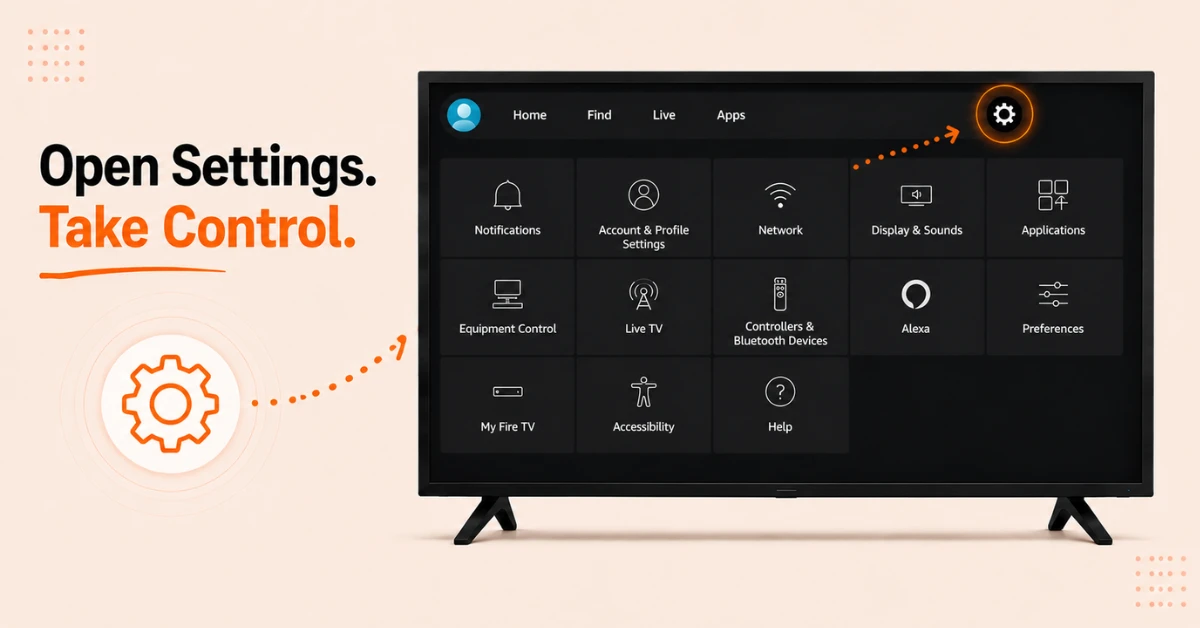
Open Settings on Your Firestick
-
From the Firestick home screen navigate to the top menu bar
-
Scroll right and select Settings
-
Use your remote to browse through the options on the next screen
Step 02
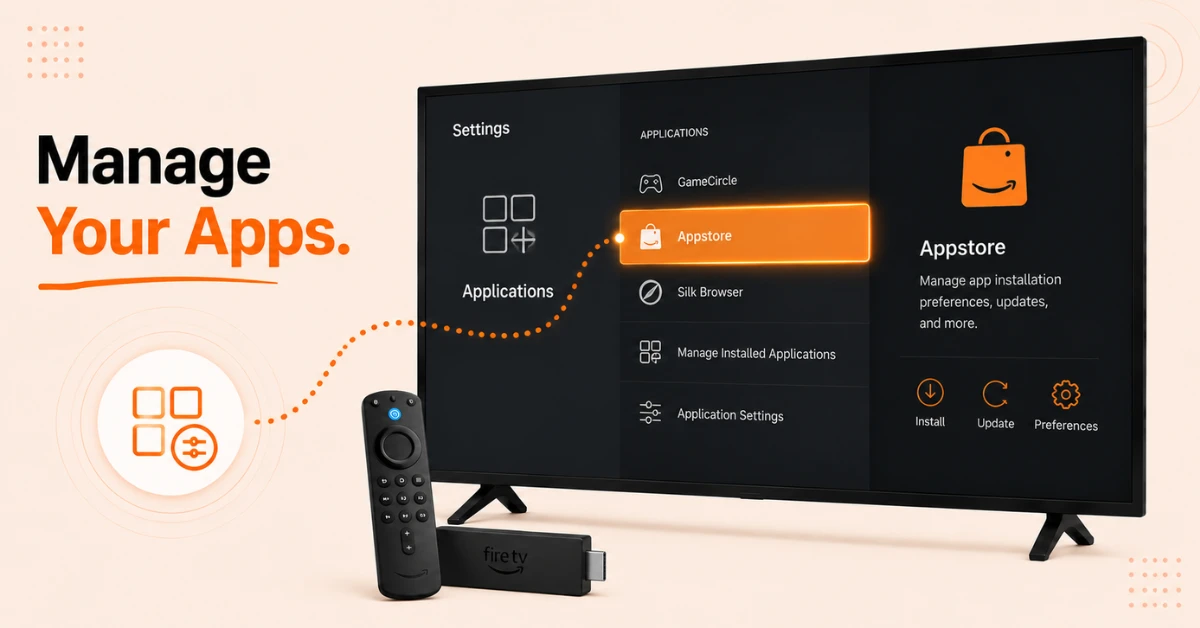
Go to Applications
-
Inside Settings scroll and select Applications
-
Look for the Appstore option in the list and click on it
-
This is where all app installation and update preferences are managed
Get NordVPN — 20% Off
Step 03
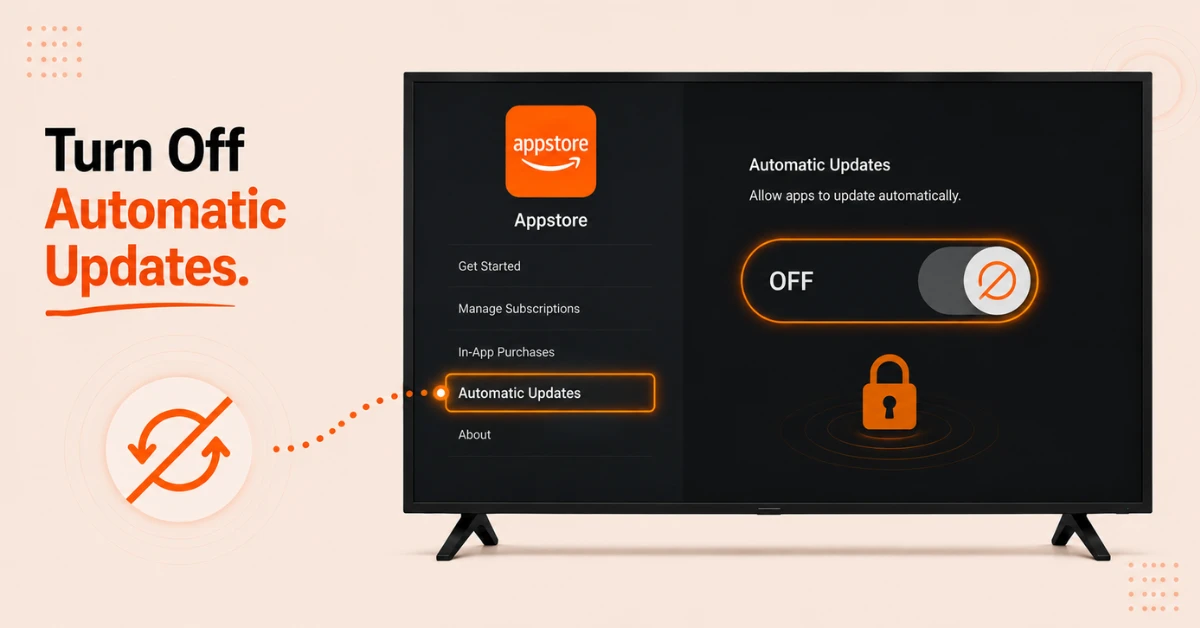
Turn Off Automatic Updates
-
Inside Appstore find the Automatic Updates option
-
Click on it to toggle the setting
-
Switch it from On to Off to stop all apps from updating automatically
Step 04
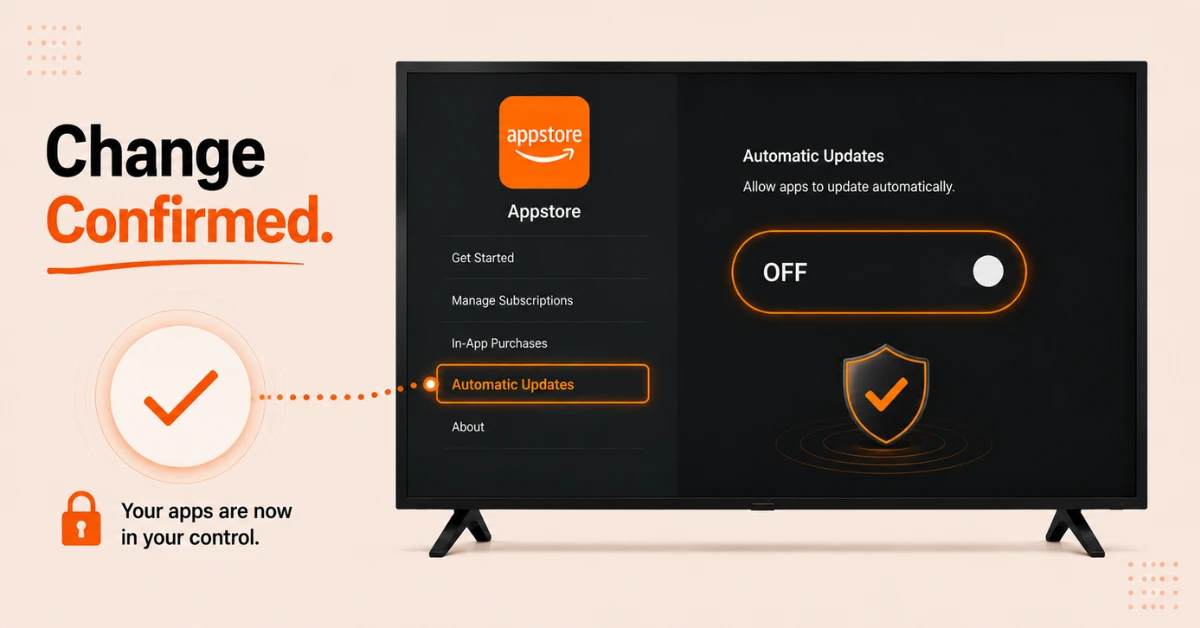
Confirm the Change
-
Once turned off the setting will display as Off on screen
-
Your apps will no longer update on their own without your action
-
To update an app manually go to Find, search for the app, and select Download or Update
Quick Comparison
Side-by-side comparison of top Fire Stick VPNs
| VPN | Price | Servers | Speed | Devices | Rating | Actions |
|---|---|---|---|---|---|---|
|
NordVPN
|
$4.39/mo | 6,998+ | Blazing Fast | 8 | 4.8 | Get Deal |
|
|
$1.88/mo | 3,200+ | Blazing Fast | 8 | 4.7 | Get Deal |
 EXPRESS VPN
|
$2.79/mo | 3,000+ | Blazing Fast | 8 | 5 | Get Deal |
 Proton VPN
|
$3.99/mo | 14,999+ | Blazing Fast | 7 | 4.8 | Get Deal |
 PrivadoVPN
|
$1.99/mo | — | Blazing Fast | 5 | 4 | Get Deal |
 Pure VPN
|
$3.55/mo | — | Blazing Fast | 6 | 4 | Get Deal |
Frequently Asked Questions
Why do my apps keep updating on Firestick even when I am watching something?
Firestick updates apps in the background by default whenever a connection is available. Turning off Automatic Updates under Appstore in Settings stops this from happening.
Is it safe to disable automatic app updates on Firestick?
It is generally safe for most users. Keeping updates off gives you more stability but it also means you may miss bug fixes or new features until you update manually.
Can I disable automatic updates for just one app on Firestick?
No, the Automatic Updates setting in Appstore applies to all apps at once. Firestick does not currently offer an option to turn off auto updates for individual apps only.
How do I manually update an app after turning off updates on Firestick?
Go to Find and search for the app by name. If an update is available you will see a Download or Update button on the app page instead of Open.
Where is the setting to turn off app updates on Firestick?
The setting is under Settings, then Applications, then Appstore. The Automatic Updates toggle is right there and switching it off stops all background app updates immediately.
Does turning Fire TV automatic updates off stop system updates too?
No, this setting only controls app updates through the Appstore. System or firmware updates for Fire TV are managed separately by Amazon and follow a different process.
Will stopping app updates on Firestick cause any apps to stop working?
Most apps continue to work perfectly on older versions. In rare cases a streaming service may push a required update that locks older versions out but this is uncommon.